A status meeting is not a meeting. It is a ritual for collecting information that should already be available. People gather, take turns asking "where does this stand," and spend half an hour writing down answers, just so they know what they should have known before walking in. The actual work starts afterward.
The work nobody wants
Research consistently shows that managers spend dozens of hours a week in meetings. A large share of that time is not decision-making. It is update rounds where everyone reports what is in their task list and what is waiting on a customer. The information exists. It is in the calendar, in the CRM, in the task board. But it lives in separate tools, and nobody has it all in one place.
The result: before any real work can happen, twenty minutes evaporate just assembling context. And if someone is sick or on another call, the gap gets filled with guesswork. The project ends up managed on impressions, not data.
We meet at three. Fifteen minutes of "where does this stand." Then someone has to leave. The decision gets pushed to Friday.
— Project lead, small Czech agency: a recurring scene
What this actually means: Claude + MCP + your data
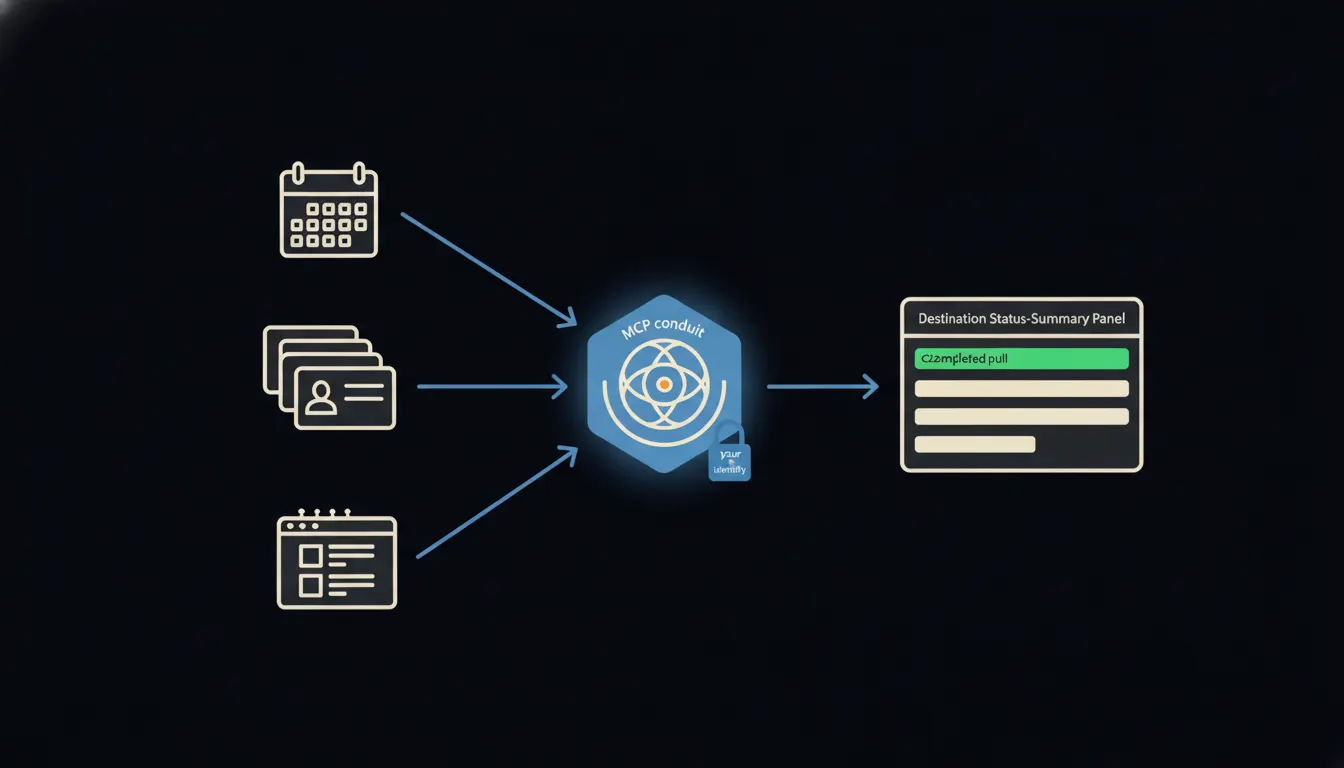
The connection works simply. For each system a company already uses (calendar, CRM, task board), a small MCP server is built. That server carries your identity and your permissions. When you ask Claude "where does the Novak project stand?", Claude reaches through those servers to the data you yourself would have access to, and only that data. No copies, no caching, nothing routed outside your infrastructure.
Claude then assembles a picture from what it finds: open tasks, most recent CRM contact, nearest deadline in the calendar. The answer comes back in seconds. The status meeting can stay on the calendar, but it starts where it belongs: at decisions, not at data collection.
Concretely: Raynet CRM, Freelo and Google Calendar
A typical small Czech company keeps its contacts in Raynet, its tasks in Freelo and its deadlines in Google Calendar. Three tools, three logins, three separate views. Adding MCP servers for each of those systems changes nothing about the tools themselves. They stay exactly where they are. One thing changes: Claude can read them under your identity and answer a direct question.
- Which tasks have deadlines this week, and who owns them?
- When was the last contact with the client, and what was agreed?
- Are the calendar milestones aligned with what the task board shows?
- Where are the gaps: tasks without an owner, contacts without a follow-up?
- What is blocked and waiting on you as the project lead?
A project lead asks first thing in the morning: "Give me a status summary for the Novak project this week." Claude reads Freelo, Raynet and Calendar under that lead's identity and returns a bullet-point overview. In thirty seconds they know more than a twenty-minute meeting would have surfaced, and with the certainty that the numbers are current.
What an AI project status will not do and why that is good
Claude assembles a picture from the data. It does not decide what happens to the project next. If a deadline is at risk, it will say so, but whether the deadline shifts, resources get added, or the client gets a new proposal is your call. Escalation, rebalancing capacity, calling the customer: these are moments where context extends beyond data and where human judgement matters.
This boundary is not a technical limitation. It is intentional. A picture without a decision baked in is exactly what you want from the system: fast, accurate, neutral. The interpretation and the action stay with you.
What it would take
For each system (Raynet, Freelo, Google Calendar), one MCP server is built. The server runs on your infrastructure, not ours. It carries your identity and your permissions. Claude can then read those systems on request. No year-long implementation, no new central platform, no data moved to a third-party cloud.
What remains
The model is not the bottleneck. The bottleneck is the gap between what Claude can do and the data your company already holds. The calendar is full. The CRM is full. The task board is full. But Claude cannot see any of it, and so you keep calling meetings to hand that information across verbally. Closing this gap is not a large project. It is a series of small, focused bridges, each one carrying your identity.
Write to us. A short call is enough. We will show you which systems are worth connecting first and what a live project status summary looks like in practice.